What the Formula? Managing state on Android

State management is usually the most complex part of a UI application. At Instacart, we have been using RxJava to manage state for a few years now. As our Android team grew, we realized that there was a steep learning curve for new developers to get started. We started to experiment with how we could reduce complexity. After a few iterations, we are excited to announce Formula — an open-source state management library built in Kotlin. Formula provides a simple, declarative, and composable API for managing your app complexity. The goal is to express the essence of your program without much ceremony.
Building a simple app
Probably the easiest way to show you how Formula works is to build a simple stopwatch application. It will show how long the stopwatch has been running and allow the user to start/stop or reset it.
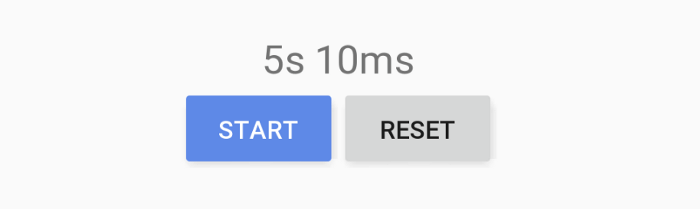
When working with Formula, the recommended way to start is by defining what the UI needs to display and what actions the user will be able to take. We model this with Kotlin data classes and call this concept a RenderModel. We model user actions as event listeners on the render model.
data class StopwatchRenderModel(
    val timePassed: String,
    val startStopButton: ButtonRenderModel,
    val resetButton: ButtonRenderModel
)

data class ButtonRenderModel(
    val text: String,
    val onSelected: () -> Unit
)
Render model is an immutable representation of your view. Any time we want to update UI, we will create a new instance and pass it to the RenderView. Render view is responsible for taking a render model and applying it to Android views.
class StopwatchRenderView(root: ViewGroup): RenderView<StopwatchRenderModel> {
    private val timePassed: TextView = root.findViewById(R.id.time_passed_text_view)
    private val startStopButton: Button = root.findViewById(R.id.start_stop_button)
    private val resetButton: Button = root.findViewById(R.id.reset_button)

    override val renderer: Renderer<StopwatchRenderModel> = Renderer.create { model ->
        timePassed.text = model.timePassed

        startStopButton.text = model.startStopButton.text
        startStopButton.setOnClickListener {
            model.startStopButton.onSelected()
        }

        resetButton.text = model.resetButton.text
        resetButton.setOnClickListener {
            model.resetButton.onSelected()
        }
    }
}
Note: we could refactor out a reusable ButtonRenderView.
With rendering logic out of the way, let’s see how we actually create the render model. Render model creation is the responsibility of the Formula interface. Let’s create a StopwatchFormula class that extends it.
class StopwatchFormula : Formula<Unit, StopwatchFormula.State, StopwatchRenderModel> {
    // We will use this a little later.
    object State

    override fun initialState(input: Unit): State = State

    override fun evaluate(
        input: Unit,
        state: State,
        context: FormulaContext<State>
    ): Evaluation<StopwatchRenderModel> {
        return Evaluation(
            renderModel = StopwatchRenderModel(
                timePassed = "5s 10",
                startStopButton = ButtonRenderModel(
                    text = "Start",
                    onSelected = { /* TODO */ }
                ),
                resetButton = ButtonRenderModel(
                    text = "Reset",
                    onSelected = { /* TODO */ }
                )
            )
        )
    }
}
Formula interface takes three generic parameters: Input, State and Render Model (we will not use input in this example). In Formula, we keep all our dynamic properties within a single Kotlin data class which we call State. For the time being, we will use an empty State object as a placeholder. The evaluate function takes the current state and is responsible for creating the render model.
Our current implementation always returns the same render model. Before we make it dynamic, let’s connect this implementation to our render view. There is an extension function start that creates an RxJava observable from the Formula interface.
class StopwatchActivity : FragmentActivity() {

    private val disposables = CompositeDisposable()

    override fun onCreate(savedInstanceState: Bundle?) {
        super.onCreate(savedInstanceState)
        setContentView(R.layout.stopwatch_activity)

        val renderView = StopwatchRenderView(findViewById(R.id.activity_content))
        val renderModels: Observable<StopwatchRenderModel> =
            StopwatchFormula().start(Unit)
        disposables.add(renderModels.subscribe(renderView.renderer::render))
    }

    override fun onDestroy() {
        disposables.clear()
        super.onDestroy()
    }
}
For simplicity sake, I’ve placed this logic directly in the activity. In a real application, it should be placed within a surface that survives configuration changes such as AndroidX ViewModel or formula-android module.
Now that we are observing render model changes, let’s start making the UI dynamic. For example, when the user clicks the “Start” button, we want to reflect this change and update the button to show “Stop”. We need a dynamic property to keep track if the stopwatch was started. Let’s update our State to include isRunning. We initially set isRunning to false. If you have worked with Redux or MVI, this should look familiar to you.
class StopwatchFormula : Formula<Unit, StopwatchFormula.State, StopwatchRenderModel> {

    data class State(
        val isRunning: Boolean
    )

    override fun initialState(input: Unit): State = State(
        isRunning = false
    )

    ....
}
Let’s update the start/stop button render model creation.
fun startStopButton(state: State): ButtonRenderModel {
  return ButtonRenderModel(
    text = if (state.isRunning) "Stop" else "Start",
    onSelected = { /* TODO: toggle the stopwatch */ }
  )
}
Any time user clicks this button, we want to toggle isRunning and create a new render model. We will use FormulaContext to accomplish this.
fun startStopButton(state: State, context: FormulaContext<State>): ButtonRenderModel {
    return if (state.isRunning) {
        ButtonRenderModel(
            text = "Stop",
            onSelected = context.callback {
                transition(state.copy(isRunning = false))
            }
        )
    } else {
        ButtonRenderModel(
            text = "Start",
            onSelected = context.callback {
                transition(state.copy(isRunning = true))
            }
        )
    }
}
FormulaContext is a special object passed by the runtime that allows us to create callbacks and define transitions to a new state. Any time onSelected is called we transition to a state where isRunning is inverted (if it was true it becomes false and vice-versa). Instead of mutating the state, we use the data class copy method to create a new instance. A transition will cause evaluateto be called again with the new state, new render model will be created, the Observable will emit the new value and our UI will be updated.
Now that we have a functioning button, we actually need to run the stopwatch and update the UI as time passes. Let’s add a new property to our state class.
class StopwatchFormula : Formula<Unit, StopwatchFormula.State, StopwatchRenderModel> {

    data class State(
        val timePassedInMillis: Long,
        val isRunning: Boolean
    )

    override fun initialState(input: Unit): State = State(
        timePassedInMillis = 0,
        isRunning = false
    )

    ....
}
The actual implementation to create a display value from milliseconds is a bit complex, so let’s just append ms to time passed.
fun formatTimePassed(timePassedInMillis: Long): String {
  // TODO: actually format it
  return "${timePassedInMillis}ms"
}
To update timePassedInMillis we will use the RxJava interval operator.
Observable
  .interval(1, TimeUnit.MILLISECONDS)
  .observeOn(AndroidSchedulers.mainThread())
When the stopwatch is running, we want to listen to this observable and update timePassedInMillis on each event. To add this behavior we need to update evaluatefunction. As part of each state change, Formula can decide what services it wants to run and listen to. We update our Evaluation and use conditional logic within context.updates block to declare when we want our observable to run.
override fun evaluate(
    input: Unit,
    state: State,
    context: FormulaContext<State>
): Evaluation<StopwatchRenderModel> {
    return Evaluation(
        renderModel = ...,
        updates = context.updates {
            if (state.isRunning) {
                val incrementTimePassedEvents = RxStream.fromObservable {
                    Observable
                        .interval(1, TimeUnit.MILLISECONDS)
                        .observeOn(AndroidSchedulers.mainThread())
                }

                events(incrementTimePassedEvents) {
                    transition(state.copy(
                        timePassedInMillis = state.timePassedInMillis + 1
                    ))
                }
            }
        }
    )
}
Starting the stopwatch now updates the time passed label. The logic here is very simple: when isRunning is true, listen to incrementTimePassedEvents and increment timePassedInMillis. The updates mechanism is agnostic to RxJava so you need to wrap it using RxStream. The event callback is very similar to UI event callbacks except it’s already scoped so you don’t need to use context.callback.
We still need to handle the reset button clicks. This is the same as implementing the start/stop button. There are no new concepts to introduce here. Any time reset button is selected we transition to a new state where timePassedInMillis is set to 0 and isRunning is set to false.
fun resetButton(state: State, context: FormulaContext<State>): ButtonRenderModel {
    return ButtonRenderModel(
        text = "Reset",
        onSelected = context.callback {
            transition(state.copy(timePassedInMillis = 0, isRunning = false))
        }
    )
}
And we are done. You can find the source code here.
Learning More
There are still a lot of things that we didn’t go over such as composition, testing or side-effects. If you want to learn more, take a look at the documentation, samples or the Github repository. If you have any questions or feedback you can find me on Twitter.
Interested in projects like Formula? Check out Instacart’s current engineering openings here.
Thanks to Kaushik Gopal, François Blavoet, and Charles Durham.

Laimonas Turauskas
Author
Laimonas Turauskas is a member of the Instacart team. To read more of Laimonas Turauskas's posts, you can browse the company blog or search by keyword using the search bar at the top of the page.